Game Controller Mockup: Visualize Custom Designs
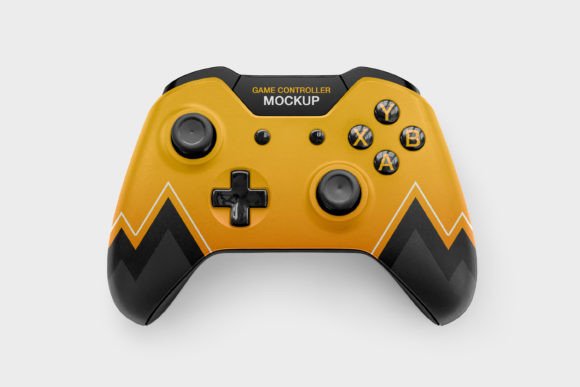
Visualizing a custom peripheral design before committing to manufacturing or marketing is one of the most critical steps in product development. A high-quality Game Controller Mockup serves as the bridge between a digital concept and a tangible reality, allowing designers, marketers, and creators to evaluate aesthetics, branding placement, and overall appeal without physical prototyping costs. When you color your video gaming setup with creative designs, the ability to preview those changes accurately determines whether a project succeeds or stalls. This resource provides a professional-grade PSD template specifically tailored for Xbox-style controllers, enabling you to customize surfaces with game logos, favorite characters, or intricate patterns with confidence.
Eliminating Guesswork in Peripheral Customization
The primary challenge in designing custom gaming hardware is predicting how two-dimensional artwork translates onto three-dimensional, curved surfaces. Flat design files often fail to account for the ergonomic contours, button recesses, and material textures of a joystick. This disconnect can lead to distorted logos, awkward pattern breaks, or color mismatches that only become apparent after production. By utilizing this Game Controller Mockup, you remove the uncertainty from the coloring process. The smart object functionality within the PSD allows you to wrap designs around the controller’s geometry realistically, ensuring that what you see on screen matches the intended physical output.
This accuracy is particularly valuable when testing complex visual elements. For example, a character illustration might look perfect on a canvas but could be obscured by the analog sticks or triggers when applied to hardware. Testing these placements digitally saves significant time and prevents costly reprints. You can experiment with saturation, contrast, and scale in real-time, adjusting the design until it harmonizes with the controller's form factor rather than fighting against it.
Technical Specifications for Professional Workflows
Professional presentation requires resolution that withstands scrutiny across various media formats. This mockup delivers dimensions of 3840x2160 px, providing 4K clarity suitable for large-format prints, detailed web portfolios, and high-definition video content. The file size of 79 MB indicates a dense layer structure with preserved texture information, lighting maps, and shadow details that lighter, free alternatives often lack. These technical attributes ensure that the final render retains depth and realism, avoiding the plastic, artificial look that undermines credibility in commercial presentations.
- Resolution: 3840x2160 px ensures crisp details for zoom-ins and crop flexibility.
- Format: Layered PSD compatible with Adobe Photoshop and similar editing software.
- File Size: 79 MB containing comprehensive texture and lighting data.
- Compatibility: Optimized for Xbox controller topology and button layouts.
Streamlining Client Approvals and Stakeholder Communication
For freelancers, agencies, and small business owners, communicating a vision to non-technical stakeholders is often harder than the design work itself. Clients may struggle to interpret wireframes or flat vector files, leading to hesitation or unnecessary revision cycles. A photorealistic Game Controller Mockup acts as a universal language. When a client sees their logo embossed on a textured grip or a specific colorway rendered with accurate studio lighting, they can make informed decisions quickly. This visualization tool transforms abstract concepts into concrete assets, facilitating faster approvals and reducing the friction typically associated with hardware design feedback loops.
Educators and content creators also benefit from this immediate visual clarity. When teaching product design or creating tutorials on customization, showing the end result alongside the process helps learners understand spatial relationships and surface mapping. Instead of describing how a pattern should curve around the handle, you can demonstrate it instantly. This practical application strengthens educational content and makes portfolio pieces more compelling to potential employers or customers who value execution over mere ideation.
Practical Applications Across Different Roles
The utility of this mockup extends beyond traditional graphic design. Understanding who benefits most helps in leveraging the asset effectively across different domains:
- Merchandise Sellers: Entrepreneurs selling custom skins or limited-edition controllers can generate professional product photography without renting a studio or hiring a photographer. This drastically reduces overhead while maintaining brand consistency across listings.
- Game Developers: Studios releasing branded peripherals can use the mockup for press kits, crowdfunding campaigns, and social media teasers long before physical units are available for review.
- Tech Reviewers and Bloggers: Content creators discussing modding or customization can illustrate their articles with high-fidelity renders that match their site’s aesthetic, improving reader engagement and dwell time.
- Print-on-Demand Services: Vendors can offer customers a realistic preview of their personalized designs, increasing conversion rates by reducing purchase anxiety regarding the final appearance.
Balancing Creative Freedom with Technical Constraints
While this Game Controller Mockup offers extensive creative latitude, users must remain mindful of practical limitations inherent to the medium. The PSD represents an idealized version of an Xbox controller; actual manufacturing processes like hydro-dipping, UV printing, or vinyl wrapping have their own tolerances and color gamuts. A vibrant neon gradient that renders beautifully at 3840x2160 px might require specific ink profiles or substrate preparation to replicate physically. Therefore, this tool should be viewed as a visualization aid for design validation and marketing, not a guaranteed production proof.
Additionally, the 79 MB file size demands adequate system resources. Users working on older machines or laptops with limited RAM may experience lag when manipulating smart objects at full resolution. It is advisable to work at a lower resolution during the initial drafting phase and only upscale to full 4K for final rendering. Comparing this resource against other options is also wise; if your project targets PlayStation or Nintendo hardware, an Xbox-specific topology will yield inaccurate results. Always verify that the controller shape matches your target audience’s ecosystem before investing time in customization.
Maximizing Value Through Strategic Implementation
To derive the best results from this free PSD, approach the customization process systematically. Start by establishing a clear hierarchy for your visual elements. Determine whether the logo, character art, or background pattern takes precedence, and use the mockup’s layers to adjust opacity and blending modes accordingly. Pay attention to the existing texture maps; preserving the subtle grain of the plastic or rubber grips adds authenticity that flat overlays cannot achieve. Disabling or modifying these texture layers often results in a sterile image that fails to connect with viewers familiar with gaming hardware.
Consider the context of your final output as well. If the mockup is destined for a dark-mode website or a moody Instagram feed, utilize the lighting layers to enhance drama and focus. Conversely, for e-commerce listings where clarity is paramount, brighten the scene and ensure even illumination across all buttons and surfaces. The versatility of the PSD format supports both approaches, but only if the user actively manages the environmental variables rather than accepting default settings. By treating this Game Controller Mockup as a flexible foundation rather than a static template, you unlock its full potential to elevate your creative projects, streamline your workflow, and present your ideas with professional authority.